> For the complete documentation index, see [llms.txt](https://devdaisy.gitbook.io/edura/llms.txt). Markdown versions of documentation pages are available by appending `.md` to page URLs; this page is available as [Markdown](https://devdaisy.gitbook.io/edura/readme.md).
# ⚫✨ Edura – AI-Powered Learning Platform
[](/edura/readme.md) [](/edura/readme.md) [](/edura/readme.md) [](/edura/readme.md) [](/edura/readme.md) [](/edura/readme.md) [](/edura/readme.md) [](/edura/readme.md) [](/edura/readme.md) [](/edura/readme.md) [](/edura/readme.md) [](/edura/readme.md) [](/edura/readme.md) [](/edura/readme.md) [](/edura/readme.md) [](/edura/readme.md)
## **Table of Contents**
1. [Overview](#overview)
2. [Key Features](#key-features)
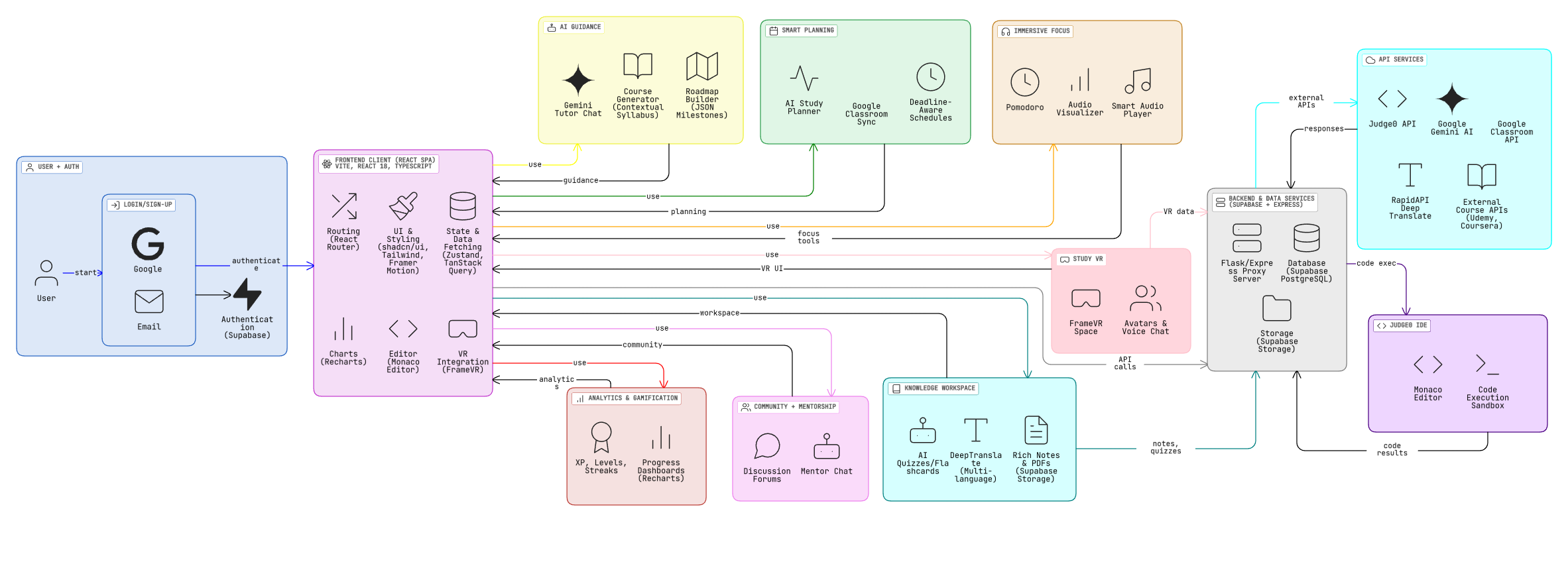
3. [Architecture](#architecture)
4. [Project Structure](#project-structure)
5. [Prerequisites](#prerequisites)
6. [Installation & Setup](#installation)
7. [Environment Variables](#environment-variables)
8. [Routes](#routing)
9. [Dependencies](#dependencies)
10. [Security](#security)
11. [Development](#development)
12. [Deployment](#deployment)
13. [Contributing](#contributing)
14. [Roadmap](#roadmap)
15. [License & Support](#license-support)
## **Overview**
Edura blends AI tutoring, collaborative learning spaces, and productivity tooling into a single app. Learners can generate personalized courses, stay accountable with AI study planners, focus using immersive audio/visual experiences, jump into a shared Study VR room for collaborative sessions, and sync tasks from Google Classroom while keeping all content stored securely on Supabase.
## **Key Features**
### **Highlights**

* **AI Guidance**: Gemini-powered tutor, roadmap builder, and course generator deliver contextual explanations, milestones, and syllabus drafts.
* **Smart Planning**: AI Study Planner pairs Monaco/Judge0 practice tasks with auto-generated schedules and Google Classroom imports.
* **Immersive Focus & VR**: Pomodoro room with adaptive audio/visuals, XP rewards, streak tracking, plus a dedicated Study VR space powered by FrameVR for real-time virtual collaboration.
* **Knowledge Workspace**: Rich notes, flashcards, quizzes, discussions, mentor chat, and study groups with multilingual translation.
* **Study Materials Hub**: Upload and organize PDFs, notes, and references with Supabase Storage folders tied to each course.
* **AI Revision Kit**: Generate quizzes and flashcards directly from uploaded content so students can drill tricky sections instantly.
* **Progress Intelligence**: Track streaks, XP, subject mastery, and assignment completion in unified analytics dashboards.
* **Deadline-Aware Schedules**: Smart suggestions prioritize upcoming deadlines, Classroom imports, and personal goals to auto-build daily plans.
* **Plain-Language Explanations**: Ask any question and the tutor breaks concepts down into simple, student-friendly language.
* **Gamified Progress**: XP, levels, leaderboards, analytics dashboards, and streak reminders keep learners accountable.
* **Accessibility & Globalization**: 30+ languages, translation provider, dyslexia-friendly fonts, colorblind themes, and screen-reader friendly UI.
### **Platform Capabilities**

* **Real-time analytics** across courses, modules, and study sessions using Supabase + Recharts visualizations.
* **External integrations**: Udemy/Coursera discovery, Google Classroom assignment sync, Judge0 sandbox execution, RapidAPI Deep Translate.
* **Secure storage** with Supabase Auth + RLS, user-driven buckets for notes/audio, and Express proxy for curated course APIs.
* **Developer-friendly stack**: TypeScript, Vite, shadcn/ui, Tailwind, Zustand, TanStack Query, Framer Motion, Monaco Editor.
### **Feature Deep Dive**
#### **Learning Roadmaps**
Two modes:
1. **Simple Roadmaps** for fast goal-based plans.
2. **Detailed Roadmaps** with questionnaires that factor skill level, timeline, commitment, and target roles.
AI produces milestone JSON that feeds the roadmap UI, full descriptions, and progress calculators.
#### **Focus Room**
* Pomodoro timers
* Ambient sound player
* Visualizer feedback
* XP rewards & streak tracking
* Break reminders
#### **Study VR**
Embedded FrameVR spaces with:
* Voice/video chat
* Avatars
* WASD navigation
* Fullscreen iframe support
#### **Notes Workspace**
* Rich editor
* PDF/text uploads
* AI summaries, quizzes, flashcards
* Tagging + search
#### **Community & Mentorship**
* Discussion forums
* Study groups
* Mentor chat (AI-powered)
* Leaderboards
#### **AI Study Planner + Classroom Sync**
* Google Classroom OAuth import
* Grouped assignment panels
* AI-prioritized planning
* Optional Supabase Edge proxy
#### **Judge0 IDE Workspace**
* Monaco editor
* Multi-language snippets
* Inline errors
* Sandbox execution via Judge0
#### **Ambient Focus Audio**
* Auto-detection of local MP3 tracks
* Procedural fallback audio
* Audio analyzer → particle visualizer
## Architecture
### Technology Stack
#### Frontend
* **Framework**: React 18 with TypeScript
* **Build Tool**: Vite 7
* **Routing**: React Router DOM 6
* **State Management**:
* Zustand (global state)
* TanStack Query (server state)
* **UI Components**:
* shadcn/ui (Radix UI primitives)
* Tailwind CSS (styling)
* Framer Motion (animations)
* **Form Handling**: React Hook Form with Zod validation
* **Charts**: Recharts
#### Backend
* **Database**: Supabase (PostgreSQL)
* **Authentication**: Supabase Auth
* **Storage**: Supabase Storage
* **API**: Express.js server for external course fetching
* **AI Services**:
* Google Gemini AI (chat, summaries, flashcards, quizzes, roadmaps)
* RapidAPI Deep Translate (multi-language support)
### Project Structure
```
edura/
├── public/ # Static assets served by Vite
│ ├── audio/ # Ambient tracks + README for contributors
│ └── robots.txt # Basic crawler rules
├── server/
│ └── index.js # Express proxy for curated external courses
├── src/
│ ├── App.tsx # Root router + layout shell
│ ├── main.tsx # Vite entry point
│ ├── components/
│ │ ├── 3D/ # FrameVR + particle scenes (BrainModel, HeroScene, etc.)
│ │ ├── ui/ # shadcn/ui primitives (accordion, dialog, chart...)
│ │ ├── ClassroomAssignmentsPanel.tsx
│ │ ├── DiscussionForum.tsx
│ │ ├── IDE.tsx # Judge0-powered Monaco editor
│ │ ├── MentorChat.tsx
│ │ ├── Navbar.tsx / NavLink.tsx
│ │ ├── StudyGroupChat.tsx
│ │ ├── ThemeProvider.tsx
│ │ ├── TranslationProvider.tsx
│ │ └── UniverseVisualization.tsx
│ ├── hooks/
│ │ ├── useGoogleClassroom.ts
│ │ ├── useSoundPlayer.ts
│ │ ├── useTranslation.ts
│ │ ├── useToast.ts
│ │ └── use-mobile.tsx
│ ├── lib/
│ │ ├── auth.ts # Supabase auth helpers
│ │ ├── gemini.ts # Gemini client wrapper
│ │ ├── supabase.ts # Supabase client
│ │ └── utils.ts
│ ├── pages/
│ │ ├── AIBot.tsx # Conversational tutor
│ │ ├── Analytics.tsx
│ │ ├── Community.tsx
│ │ ├── CourseDetail.tsx
│ │ ├── Courses.tsx
│ │ ├── Dashboard.tsx
│ │ ├── FocusRoom.tsx
│ │ ├── Landing.tsx
│ │ ├── Login.tsx / Register.tsx
│ │ ├── Notes.tsx
│ │ ├── NotFound.tsx
│ │ ├── Roadmap.tsx
│ │ ├── Settings.tsx
│ │ ├── StudyPlanner.tsx
│ │ └── StudyVR.tsx # Virtual collaboration room
│ ├── services/
│ │ ├── analyticsService.ts
│ │ ├── authService.ts
│ │ ├── classroomService.ts
│ │ ├── communityService.ts
│ │ ├── courseGeneratorService.ts
│ │ ├── courseService.ts
│ │ ├── leaderboardService.ts
│ │ ├── notesService.ts
│ │ ├── roadmapService.ts / roadmapShService.ts
│ │ ├── translateService.ts
│ │ └── userService.ts
│ ├── store/
│ │ ├── themeStore.ts
│ │ └── userStore.ts
│ ├── types/
│ │ └── classroom.ts
│ └── utils/
│ └── generateSchedule.js
├── supabase-schema.sql # Database schema + policies
├── tailwind.config.ts # Tailwind + shadcn presets
├── tsconfig*.json # TS build configs
├── vite.config.ts # Vite plugins + aliases
└── package.json # Scripts and dependencies
```
### Database Schema
The application uses Supabase (PostgreSQL) with the following main tables:
#### Core Tables
* **users**: User profiles (extends Supabase auth.users)
* XP, level, streak tracking
* Linked to auth.users via UUID
* **courses**: Course metadata
* Title, description, level, category
* Multi-language support (JSONB)
* Published status
* **modules**: Course modules
* Content (JSONB) with text, video, code blocks
* Flashcards, practice tasks, quizzes
* IDE tasks for programming courses
* Time estimates
* **user\_course\_progress**: Progress tracking
* Completed modules count
* Progress percentage
* Quiz scores (JSONB)
* Last accessed timestamp
* **notes**: User notes
* Title, content, summary
* File attachments (Supabase Storage)
* AI-generated summaries
* **roadmaps**: Learning roadmaps
* Goal description
* Milestones (JSONB array)
* Progress percentage
* **study\_sessions**: Focus room sessions
* Duration, XP earned
* Mode (focus/break)
#### Security
* Row Level Security (RLS) enabled on all tables
* Policies ensure users can only access their own data
* Public courses are viewable by all authenticated users
### API Architecture
#### Frontend API Layer
* **Supabase Client**: Direct database access via Supabase JS SDK
* **Service Layer**: Business logic abstraction in `src/services/`
* **React Query**: Caching and state management for server data
#### Backend API (Express Server)
* **Port**: 3001
* **Endpoints**:
* `GET /api/courses/external` - Fetch external courses (Udemy/Coursera)
* `GET /health` - Health check
#### External APIs
* **Google Gemini AI**:
* Chat responses
* Content summarization
* Quiz/flashcard generation
* Roadmap generation
* **RapidAPI Deep Translate**:
* Text translation
* Multi-language support
* Translation caching
### State Management
#### Zustand Stores
* **userStore**: Authentication state, user profile
* **themeStore**: Theme preferences, accessibility settings, language
#### React Query
* Server state caching
* Automatic refetching
* Optimistic updates
### Routing
Protected routes require authentication:
* `/dashboard` - User dashboard
* `/courses` - Course browser
* `/courses/:courseId` - Course detail
* `/ai-bot` - AI chat
* `/roadmap` - Learning roadmaps
* `/notes` - Notes management
* `/focus` - Focus room
* `/study-planner` - AI planner with Classroom imports
* `/study-vr` - Virtual reality collaboration room
* `/community` - Community features
* `/analytics` - Analytics
* `/settings` - Settings
* `*` - NotFound fallback
Public routes:
* `/` - Landing page
* `/login` - Login
* `/register` - Registration
## Getting Started
### Prerequisites
* Node.js 18+ and npm
* A Supabase account (free tier works)
* Google Gemini API key
* RapidAPI account (for translation features and hosted Judge0 access, optional)
* Google Cloud project with the Classroom API enabled (for Google Classroom import)
* Judge0 sandbox (self-hosted container or RapidAPI Judge0 CE plan) for the IDE
### Installation
1. **Clone the repository**
```bash
git clone
cd edura
```
2. **Install dependencies**
```bash
npm install
```
3. **Set up environment variables**
Create a `.env` file in the root directory:
```bash
### Supabase Configuration
VITE_SUPABASE_URL=your-supabase-project-url
VITE_SUPABASE_ANON_KEY=your-supabase-anon-key
### Google Gemini AI Configuration
VITE_GEMINI_API_KEY=your-gemini-api-key
VITE_GEMINI_MODEL=gemini-model
### RapidAPI Configuration (for Translation Service)
VITE_RAPIDAPI_KEY=your-rapidapi-key
### Google Classroom OAuth
VITE_GOOGLE_CLIENT_ID=your-oauth-client-id.apps.googleusercontent.com
### Optional: Supabase Edge proxy that fetches Classroom data server-side
VITE_CLASSROOM_PROXY_URL=https://.functions.supabase.co/classroom-sync
### Judge0 Sandbox (required for IDE)
VITE_JUDGE0_URL=http://localhost:2358
### Optional: Needed when using RapidAPI or hosted Judge0 that requires auth headers
VITE_JUDGE0_HOST=judge0-ce.p.rapidapi.com
VITE_JUDGE0_KEY=your-judge0-api-key
### Backend API Configuration (optional)
VITE_API_URL=http://localhost:3001
```
4. **Set up Supabase**
* Create a new project at [supabase.com](https://supabase.com)
* Go to SQL Editor and run `supabase-schema.sql`
* Get your credentials from Project Settings → API
* Update `.env` with your Supabase URL and anon key
5. **Get API Keys**
* **Gemini API**: Get from [Google AI Studio](https://makersuite.google.com/app/apikey)
* **RapidAPI**: Get from [RapidAPI Hub](https://rapidapi.com/hub) (subscribe to Deep Translate API)
6. **Configure Google Classroom OAuth**
* Enable the Google Classroom API in [Google Cloud Console](https://console.cloud.google.com/)
* Create an OAuth 2.0 Web Client with origin `http://localhost:8080` (or your deployed domain)
* Add the scopes used by this app (courses.readonly, coursework.me, userinfo.email/profile)
* Paste the generated client ID into `VITE_GOOGLE_CLIENT_ID`
* (Optional) Deploy a Supabase Edge Function and set `VITE_CLASSROOM_PROXY_URL` if you prefer proxying Classroom requests through your backend
7. **Optional: Add custom ambient audio**
* Drop your `.mp3` ambience files into `public/audio`
* Supported filenames: `rain.mp3`, `forest.mp3`, `cafe.mp3`, `white-noise.mp3`, `ocean.mp3`, `space.mp3`
* The Focus Room will automatically detect these; if a file is missing it falls back to generated audio
8. **Run the development servers**
```bash
# Run both frontend and backend
npm run dev:all
# Or run separately:
npm run dev # Frontend (port 8080)
npm run dev:server # Backend (port 3001)
```
9. **Open the application**
Navigate to `http://localhost:8080`
## Security
* **Environment Variables**: All API keys stored in `.env` (not committed)
* **Row Level Security**: Database-level security via Supabase RLS
* **Authentication**: Supabase Auth with JWT tokens
* **Protected Routes**: Client-side route protection
* **API Key Validation**: Server-side validation for external APIs
## Development
### Available Scripts
* `npm run dev` - Start frontend dev server
* `npm run dev:server` - Start backend server
* `npm run dev:all` - Run both servers concurrently
* `npm run build` - Build for production
* `npm run preview` - Preview production build
* `npm run lint` - Run ESLint
### Code Style
* TypeScript for type safety
* ESLint for code quality
* Prettier (via ESLint) for formatting
* Component-based architecture
## Dependencies
### Core Dependencies
* `react` & `react-dom` - UI framework
* `react-router-dom` - Routing
* `@supabase/supabase-js` - Database & auth
* `@google/genai` - Gemini AI
* `zustand` - State management
* `@tanstack/react-query` - Server state
* `framer-motion` - Animations
* `tailwindcss` - Styling
### UI Components
* `@radix-ui/*` - Accessible UI primitives
* `shadcn/ui` - Component library
* `lucide-react` - Icons
* `recharts` - Charts
## Deployment
### Frontend (Vite)
* Build: `npm run build`
* Output: `dist/` directory
* Deploy to: Vercel, Netlify, or any static host
### Backend (Express)
* Deploy to: Railway, Render, or any Node.js host
* Set environment variables in hosting platform
### Environment Variables
Ensure all environment variables are set in your hosting platform:
* `VITE_SUPABASE_URL`
* `VITE_SUPABASE_ANON_KEY`
* `VITE_GEMINI_API_KEY`
* `VITE_GEMINI_MODEL`
* `VITE_RAPIDAPI_KEY`
* `VITE_GOOGLE_CLIENT_ID`
* `VITE_CLASSROOM_PROXY_URL` (if using Supabase Edge proxy)
* `VITE_JUDGE0_URL`
* `VITE_JUDGE0_HOST` (if required)
* `VITE_JUDGE0_KEY` (if required)
* `VITE_API_URL` (if the Express server runs on a different host)
## Contributing
1. Fork the repository
2. Create a feature branch
3. Make your changes
4. Test thoroughly
5. Submit a pull request
## License
This project is licensed under the MIT License.
## Support
For issues and questions:
1. Check the browser console for errors
2. Verify environment variables are set correctly
3. Check Supabase logs (Dashboard → Logs)
4. Review the [SETUP.md](/edura/setup.md) guide
## Roadmap
* [ ] Real-time collaboration features
* [ ] Mobile app (React Native)
* [ ] Advanced analytics and insights
* [ ] Video course support
* [ ] Peer review system
* [ ] Certificate generation
* [ ] Integration with more learning platforms
## Acknowledgments
* Built with [Vite](https://vitejs.dev/)
* UI components from [shadcn/ui](https://ui.shadcn.com/)
* Database powered by [Supabase](https://supabase.com/)
* AI powered by [Google Gemini](https://deepmind.google/technologies/gemini/)
* Virtual reality environment powered by [FrameVR](https://framevr.io)
**Note**: Make sure to never commit your `.env` file. The `.env` file is already in `.gitignore` for security.
---
# Agent Instructions
This documentation is published with GitBook. GitBook is the documentation platform designed so that both humans and AI agents can read, navigate, and reason over technical content effectively. Learn more at gitbook.com.
## Querying This Documentation
If you need additional information that is not directly available in this page, you can query the documentation by asking a question.
Perform an HTTP GET request on the following URL with the `ask` and `goal` query parameters:
```
GET https://devdaisy.gitbook.io/edura/readme.md?ask=&goal=
```
`ask` is the immediate question: it should be specific, self-contained, and written in natural language.
`goal` is what the user is ultimately trying to achieve, the reason they need the answer. Sharing it helps GitBook give you a better, more relevant answer. A goal is most helpful when it describes the outcome the user wants rather than restating the question. For example, with `ask=how do I create an API token`, a goal like `automate deployments from our CI pipeline` lets GitBook tailor the answer to that use case.
The response will contain a direct answer to the question and relevant excerpts and sources from the documentation.
Use this mechanism when the answer is not explicitly present in the current page, you need clarification or additional context, or you want to retrieve related documentation sections.